ついすぽ -Tweet Export-
With this extension, users can export the tweets they are currently viewing on Twitter in CSV format. The exported data includes information such as the tweet text, URL, posting date and time, as well as the number of likes, retweets, replies, and quotes.
In today's Twitter-driven world, this extension provides a valuable tool for obtaining specific numerical data and capturing user sentiments. It can be used for qualitative and quantitative analysis, making it ideal for researchers and analysts.
For those who rely on copying and pasting data into Excel, give ついすぽ -Tweet Export- a try. It's a convenient way to export your Twitter data.
[Usage]
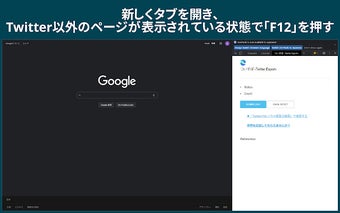
1. Open Chrome Developer Tools on a page other than Twitter (press "F12" to open).
2. Click on the "ついすぽ -Tweet Export-" tab on the right side of the Developer Tools.
3. Navigate to the Twitter search page and perform a search.
4. Keep scrolling to load more tweets (you can hold down the "End" key for convenience).
5. Click on the blue button labeled "Download" whenever you're ready. The tweets loaded up to that point will be downloaded in CSV format.